Research: How texting can improve
academic performance
Texting between teachers and students may help
improve communication and increase engagement in learning, writes Scott Hamm,
director of online education at Hardin-Simmons University in Abilene, Texas. In
this commentary, Hamm highlights research on the effectiveness of texting in
boosting academic performance. EdTech magazine online (3/30)
Sunday, April 5, 2015

Keep Hearing About "DATA" as a Way to Make Instruction More Effective?
Personally, I think that the Data Driven Instruction movement is largely misguided. Often, what I see is data being used to 'power up' instruction that is failing, not so much because the 'right' challenge isn't presented to the student at the 'right' time (an approach based on Mastery Learning, a well known approach to instruction that's been around for a good,, long time), but because that instruction is part of an outmoded paradigm of learning that the institution of School is holding onto and attempting a variety of reform approaches to make work, even though it ought to be phased out. The story of the conflict of 2 paradigms, the old, traditional one, and of a new, emerging one is a very extensive discussion for another time (and one for which I am well into writing yet another book to explain). For now, unless you've been out-of-touch with trends in School Reform, you've heard of Data Driven Instruction and, as an Instructional Technologist in the role of School Leader, you really need to be familiar with. See the article below as a good example of how this movement shows up currently 'in the conversation'...
From T.H.E. Journal: http://thejournal.com/articles/2015/04/01/big-data-is-not-bad-data.aspx
Taking a break from the business world, Cotter has recently trained her keen eye on education, where she said she sees a renaissance in data collection "The data repositories residing in disconnected, fragmented departments with little sharing have now been transformed into centralized, interrelated data systems to enable fast and efficient retrieval of interrelated data for quick and informed decision-making," she said. Here are some examples of how getting the right information to the right people at the right time can inspire teachers and students to do their best work.
Instant Feedback for Students and Parents
Classrooms usually have a wide range of academic levels, and nowhere is that more true than combination classes such as the one headed by Lisa Wilson, a fourth- and fifth-grade teacher at Arroyo Seco Elementary School in Livermore, CA. With two grade levels in the same room, Wilson individualizes the mathematics curriculum using TenMarks Math, which allows her to customize assignments for each student.
Students use the TenMarks online tool, which is essentially an interactive workbook. Wilson, a 24-year teaching veteran and technology lead teacher at her school, explained, "I get percentages and scores on the different standards they work on." She can see which students are not passing a given standard, "then I pull those students for intervention that same day."
The crucial element of timeliness makes it easier for Wilson to avoid the slow "fall through the cracks" that affects so many students. "They work in the morning, and I check scores at recess," she said. "After lunch I know who I need to work with in a small group. It used to be you would only know after you gave the test and you were onto something else, and you would never catch those kids. Since I've been using TenMarks — only since January 2015 — the number of my kids failing the math test has gone way down."
For intense practice in math facts, Wilson points her students toward XTraMath, a Web program that tracks proficiency in basic facts. For example, if students keep missing "9 times 7" or "6 times 8," they get those every other problem, and if they don't get the answer correct within a few seconds, the program will put the answer in grey scale so students have to type it in and learn it. The program provides instant feedback, and Wilson keeps a close eye on the data, making a point to know where her students are with math facts.
Spelling City and Moby Max help Wilson to track spelling and vocabulary, and to collect the most familiar bits of data: grades. "My students take online spelling tests now on Spelling City, and they wear headphones," said Wilson. "I can give students different spelling lists, and they do it on Chromebooks. Spelling City corrects the tests and sends me the scores."
School Loop helps tie it all together by allowing Wilson to tell parents how their kids are doing in real time. Wilson explained, "It's an electronic grade book, and parents can see the grades. They can get a daily e-mail of how their child is doing. That cuts down a lot on questions, because it's all listed." And, she added, "It tells parents all the things their child did not do."
Also, from ASCD's Smart Brief 4/7/2015
From T.H.E. Journal: http://thejournal.com/articles/2015/04/01/big-data-is-not-bad-data.aspx
"Data & Analytics
The Power of Small Data
In order to deliver personalized education, districts have to gather and share students' statistics. Here's how the strategic use of data can boost teaching and learning..."
"...When it seems like every week brings news of a massive theft of consumers' private information, "data" is in danger of becoming a four-letter word. But if districts want to provide truly personalized education, gathering and sharing certain types of student data is absolutely necessary. According to Patricia Cotter, a veteran entrepreneur who recently completed her doctorate in work-based learning at the University of Pennsylvania, "Recent technologies like big data, the Internet of Things, mobile apps and improved storage have made it possible to acquire, combine, store, analyze, interpret and report findings during any phase of data management."Taking a break from the business world, Cotter has recently trained her keen eye on education, where she said she sees a renaissance in data collection "The data repositories residing in disconnected, fragmented departments with little sharing have now been transformed into centralized, interrelated data systems to enable fast and efficient retrieval of interrelated data for quick and informed decision-making," she said. Here are some examples of how getting the right information to the right people at the right time can inspire teachers and students to do their best work.
Instant Feedback for Students and Parents
Classrooms usually have a wide range of academic levels, and nowhere is that more true than combination classes such as the one headed by Lisa Wilson, a fourth- and fifth-grade teacher at Arroyo Seco Elementary School in Livermore, CA. With two grade levels in the same room, Wilson individualizes the mathematics curriculum using TenMarks Math, which allows her to customize assignments for each student.
Students use the TenMarks online tool, which is essentially an interactive workbook. Wilson, a 24-year teaching veteran and technology lead teacher at her school, explained, "I get percentages and scores on the different standards they work on." She can see which students are not passing a given standard, "then I pull those students for intervention that same day."
The crucial element of timeliness makes it easier for Wilson to avoid the slow "fall through the cracks" that affects so many students. "They work in the morning, and I check scores at recess," she said. "After lunch I know who I need to work with in a small group. It used to be you would only know after you gave the test and you were onto something else, and you would never catch those kids. Since I've been using TenMarks — only since January 2015 — the number of my kids failing the math test has gone way down."
For intense practice in math facts, Wilson points her students toward XTraMath, a Web program that tracks proficiency in basic facts. For example, if students keep missing "9 times 7" or "6 times 8," they get those every other problem, and if they don't get the answer correct within a few seconds, the program will put the answer in grey scale so students have to type it in and learn it. The program provides instant feedback, and Wilson keeps a close eye on the data, making a point to know where her students are with math facts.
Spelling City and Moby Max help Wilson to track spelling and vocabulary, and to collect the most familiar bits of data: grades. "My students take online spelling tests now on Spelling City, and they wear headphones," said Wilson. "I can give students different spelling lists, and they do it on Chromebooks. Spelling City corrects the tests and sends me the scores."
School Loop helps tie it all together by allowing Wilson to tell parents how their kids are doing in real time. Wilson explained, "It's an electronic grade book, and parents can see the grades. They can get a daily e-mail of how their child is doing. That cuts down a lot on questions, because it's all listed." And, she added, "It tells parents all the things their child did not do."
Also, from ASCD's Smart Brief 4/7/2015
| Special Report: Building a Data-driven Culture |
| How
can schools use data to drive conversations about student outcomes? How can
school leaders build trust for new initiatives with educators, parents, students
and the community? In this ASCD SmartBrief special report, we focus on news about these issues, including using data to improve instruction and lead discussions around performance and goal-setting. We feature a Q&A with principal Robert Rayburn. And we've included a section highlighting tips for change leaders. If you don't receive ASCD SmartBrief daily, we urge you to sign up for our free, timely e-newsletter. ASCD SmartBrief delivers the stories making news in your profession directly to your inbox -- for free. |
|
- Collaboration, communication help drive data-driven
culture
In this interview, Robert Rayburn, principal of Chavez Elementary School in Norwalk, Calif., discusses ways school leaders can help create a data-driven culture. He highlights the importance of making time for teacher collaboration and the need to bring parents into the data conversation. SmartBrief/SmartBlog on Education (4/3) Developing a Data-driven Culture - How districts are making student data work
School districts profiled in this article are using student data to enhance teaching and learning. Strategies include using data to provide instant feedback to students and parents as well as using data from formative assessments to help students make academic progress. T.H.E. Journal (4/1)
- School district uses goals, data to drive
differentiation
Goals and data can help drive differentiated learning for students and teachers, asserts Mark Garrison, a technology director. In this blog post, he highlights how his district uses this principle. "Measures of teachers and student technology use, access and skills help us benchmark our effectiveness and make adjustments throughout the year," he writes. SmartBrief/SmartBlog on Education (3/17)
- How districts are making student data work
Not just using iPads, but managing them so that using them is effective and practical
Supporting rank and file teacher colleagues in adopting and deepening an instructional practice that takes advantage of today's technology includes helping them acquire management approaches that make doing so practical and enjoyable... Here's one illustration and opportunity to do so.
https://vts.inxpo.com/scripts/Server.nxp?LASCmd=AI:4;F:QS!10100&ShowKey=23704&partnerref=EBLAST&Referrer=https%3A%2F%2Fmail.verizon.com%2Fwebmail%2Fdriver%3Fnimlet%3Dshowmessages%26view%3Demails
https://vts.inxpo.com/scripts/Server.nxp?LASCmd=AI:4;F:QS!10100&ShowKey=23704&partnerref=EBLAST&Referrer=https%3A%2F%2Fmail.verizon.com%2Fwebmail%2Fdriver%3Fnimlet%3Dshowmessages%26view%3Demails
Personalized Content - Digital AND PRINT
From EdTechDIGEST: https://edtechdigest.wordpress.com/2015/04/03/cool-tool-personalized-print-learning-solutions/
Another emerging responsibility for School Technologists in the role of School Leader, supporting staff in customizing content, either for digital or print use, as part of the movement to Personalized Learning and the opportunities to make that happen that technology presents...
Cool Tool | Personalized Print Learning Solutions
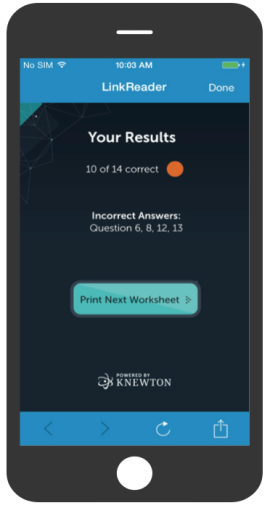 HP and Knewton, a leader in adaptive learning, have partnered to develop Personalized Print Learning Solutions, a first-of-its-kind product that will make adaptive learning technology available for print-only K-12 and college classrooms through a smartphone app. Personalized Print Learning Solutions will allow publishers to create unique printed chapters of textbooks, worksheets, and assignments for each student so that educators can assign tailored content for everyone. Using HP Link technology, they’ll scan work and submit it to Knewton via smartphone app. Knewton’s predictive analytics engine will analyze the work and determine a strategy based on previous work and the anonymized data of similar students. Knewton will assemble an individualized content packet in real time for each student. “People have always assumed it was impossible to individually personalize printed education materials,” says Knewton founder and CEO Jose Ferreira. “With our new HP collaboration, we are delighted to show the world that print materials can have just as much adaptive power as digital content.” Currently under development for release during the 2015-2016 school year, learn more at http://www.knewton.com/
Thursday, April 2, 2015
How to Build a Meaningful Vision of Education for Your School
 | ||||||||||||||||||||||||

|


Extreme Classroom Makeover: Technology Edition
Extreme Classroom Makeover: Technology Edition
Technology isn’t a computer; it’s a way of interacting with oneself and the world. It’s a space where complex and dynamic communication patterns emerge that challenge who we are, what we know and how we make sense of the world. As teachers, we are learners in this world in the same way that our students are. We are partners in a dialogue about how we create meaning in the world around us and where we fit into it. Within this space exists an exciting opportunity to be bold and take risks that have the potential to transform the function and scope of teaching and learning spaces.
More than anything, I’ve found this time to be an opportunity to revisit what I want learning to look like in my classroom and how best to leverage technology and communication spaces to achieve that ideal. As I contemplate my future classroom, these five key considerations keep coming up for me:
1. Technology is a vehicle to improve student learning, not an end in itself. I want to remember to focus on the process over the goal. Technology is only a tool to achieve deeper content knowledge and skill capacity—not the goal itself. Meaningful learning will happen as a result of what we do with the technology, not simply because of its presence in the classroom.
2. Technology is a means to engage students and bring greater relevance to what they are learning. It’s a way of hooking students into topics and themes, inviting them to use a communicative language and forum that excites them, and aligns with their generational world.
3. Technology supports diverse learners by allowing greater differentiation of tools to address language needs and learning styles. It provides a forum for communication through which all learners can dialogue, question, analyze, evaluate, and create (including the various other tasks on Webb’s Depth of Knowledge Wheel).
4. Technology extends learning outside the classroom through interaction with a rich plethora of resources, people and spaces. It serves to blur the lines between the classroom and the world by magnifying student voices and connecting them with others in new and different ways.
5. Technology engages students in the transformation process. Technology can make students feel more invested in their own learning, inviting them to metacognitively consider their own learning needs and styles.
Though the Common Core State Standards point to the importance of technology use, too many schools and districts have limited access to reliable technology. This has hindered technology transformations that should be commonplace if we are to prepare our youth for the careers and futures they are stepping into. The gap potentially creates a space for thoughtful partnerships with the business community, as well as an opportunity to extend a dialogue of how to realign existing family and community resources.
As I design my new classroom, I’ve come to realize that regardless of how much “technology” a classroom has, it isn’t the technology that is the most important component—but rather how we realign physical and virtual learning spaces to fit student needs. We also need to consider how we engage with our colleagues, students and families in discussions about what, how and why students are learning. And that doesn’t cost a dime.
As I gear up for this exciting new phase of my teaching practice, I’d love to hear from you. What have been your experiences with techology in the classroom? What tips and challenges can you share?
And here are a few technology resources I’ve found useful at this stage of the redesign process. What are your favorite resources and uses of technology in the classroom?
- Weebly: Create a free classroom website and blog.
- Edmodo: Social learning community to connect teachers, students, and parents.
- Glogster: Explore and create educational content online.
- Office of Educational Technology: Government site for technology resources and policy.
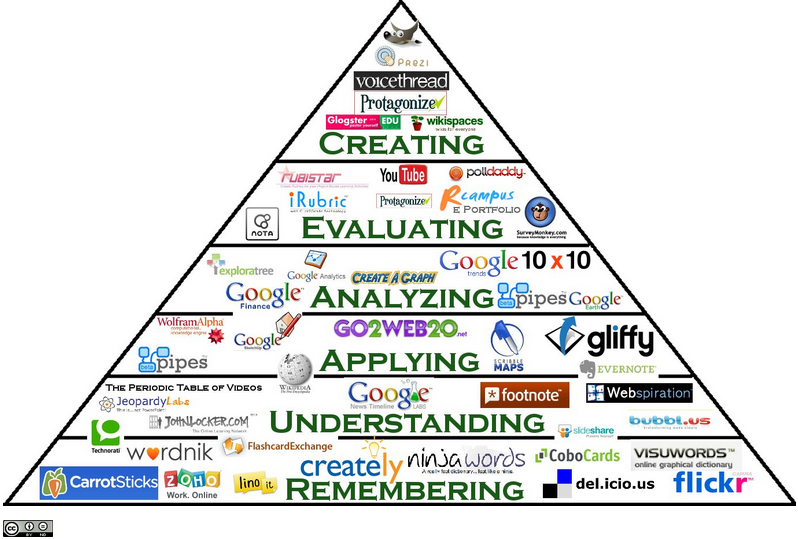
- Classroom Aid Technology Resources: Various resources compiled here, including this Bloom’s Taxonomy Chart that classifies tech resources according to learning application.
- There’s No App For Good Teaching: TED article on incorporating technology into teaching.
Wednesday, April 1, 2015
Instructional Technology grows and grows and grows. It is a growth field and as every corner of Schooling and Education turns to technology to expand, improve, or enrich itself, Instructional Technologists will be the school leaders colleagues turn to for guidance and support.


Subscribe to:
Posts (Atom)